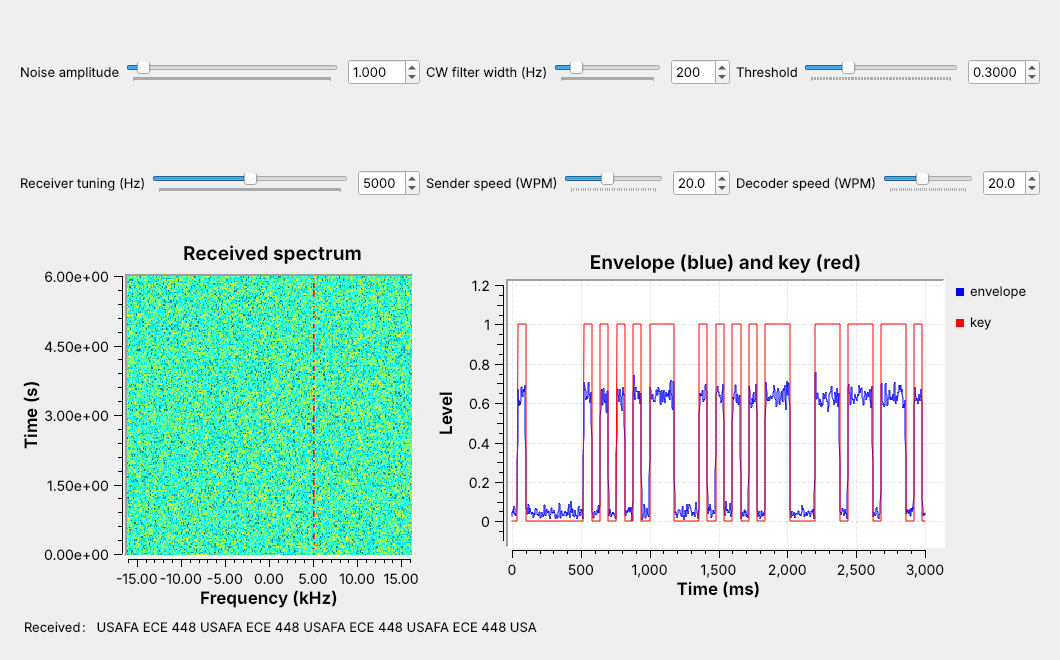
 A keyed carrier at +5 kHz, its envelope, and the decoded text.
Note:
Run L12-cw-link.grc live with the audio on. Each dash of color on the waterfall is one key-down. The blue envelope sits near 0.64 for a mark, and the red key follows it.
---
## CW and On-Off Keying
- A carrier on for a **mark**, off for a **space**
- Lesson 6's AM with a message of 0 or 1
- About 100 Hz wide, so it reaches far on little power
Still in use: amateur CW segments such as 7.000–7.125 MHz, and VOR and NDB identifiers.
Note:
CW stands for continuous wave. Pilots check a navigation beacon's Morse identifier before using it. The U.S. amateur bands keep their lowest segments for CW and data, with no voice.
---
## Morse Timing
Dit 1 unit, dah 3; gaps of 1, 3, and 7 units.
Note:
The receiver only compares lengths, so it never needs an absolute time. PARIS has 14 marks and comes to exactly 50 units with its word gap.
---
## Words per Minute
$$t_\text{dit} = \frac{1.2\text{ s}}{W}$$
| Speed | Dit | Dah | Word gap |
| :-: | :-: | :-: | :-: |
| 5 WPM | 240 ms | 720 ms | 1.68 s |
| 20 WPM | 60 ms | 180 ms | 0.42 s |
| 40 WPM | 30 ms | 90 ms | 0.21 s |
Note:
One WPM sends PARIS, 50 units, once a minute, so a unit is 1.2 s. At 20 WPM PARIS takes 3.0 s. Our line, USAFA ECE 448, is 126 units, 7.56 s at 20 WPM.
---
## The Keyer in GNU Radio
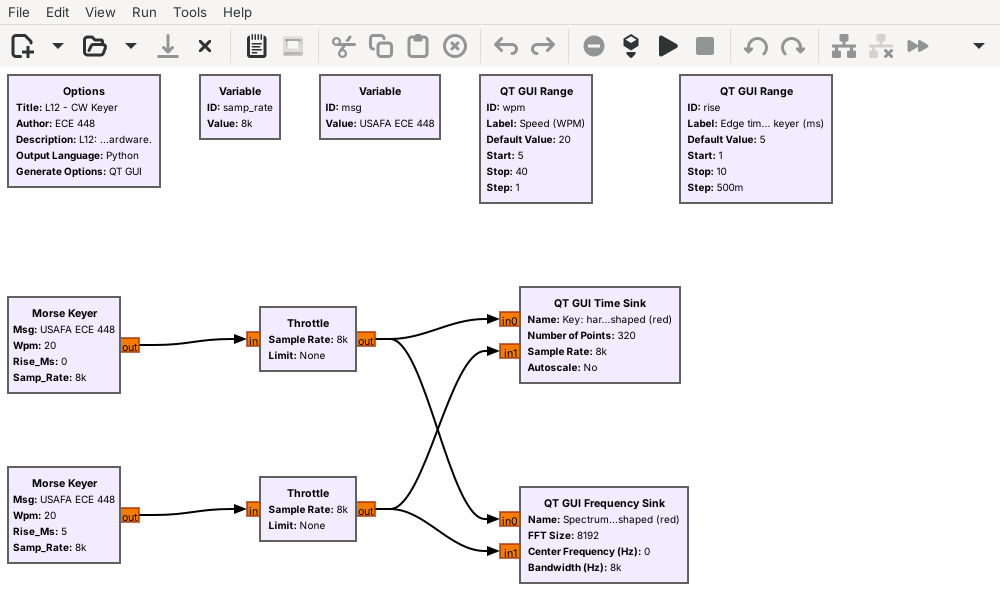 One keyer is hard-keyed; the other shapes each edge over 5 ms.
Note:
The Morse Keyer is an Embedded Python Block. It outputs 1 while the key is down and 0 while it is up, at 8 kHz. That stream is the carrier's envelope.
---
## Key Clicks
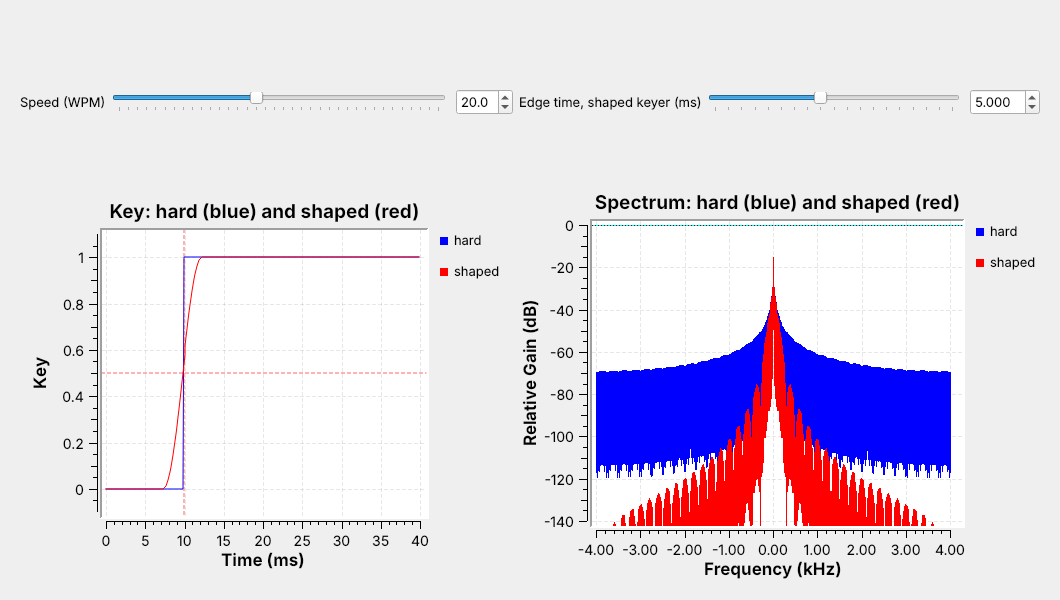 The edges look alike in time; in frequency, the shaped one stays close to the carrier.
Note:
A receiver tuned near a hard-keyed transmitter hears a click at every edge. Drag the edge-time slider live: at 1 ms the red skirts sit just below the blue, and they fall as the edge grows. The edge has to stay well under a dit; at 40 WPM a dit is 30 ms, and 5 ms edges still leave 25 ms at full power.
---
## CW Keyer Explorer
- Drag the edge time to 0: the shaped spectrum rises to meet hard keying.
- Raise the speed: the spectrum widens.
- Type your own message and read its length.
↗ Interactive on the lesson page
Note: Start with PARIS at 20 WPM, where the readouts give a 60 ms dit and 3.00 s. --- ## The Receiver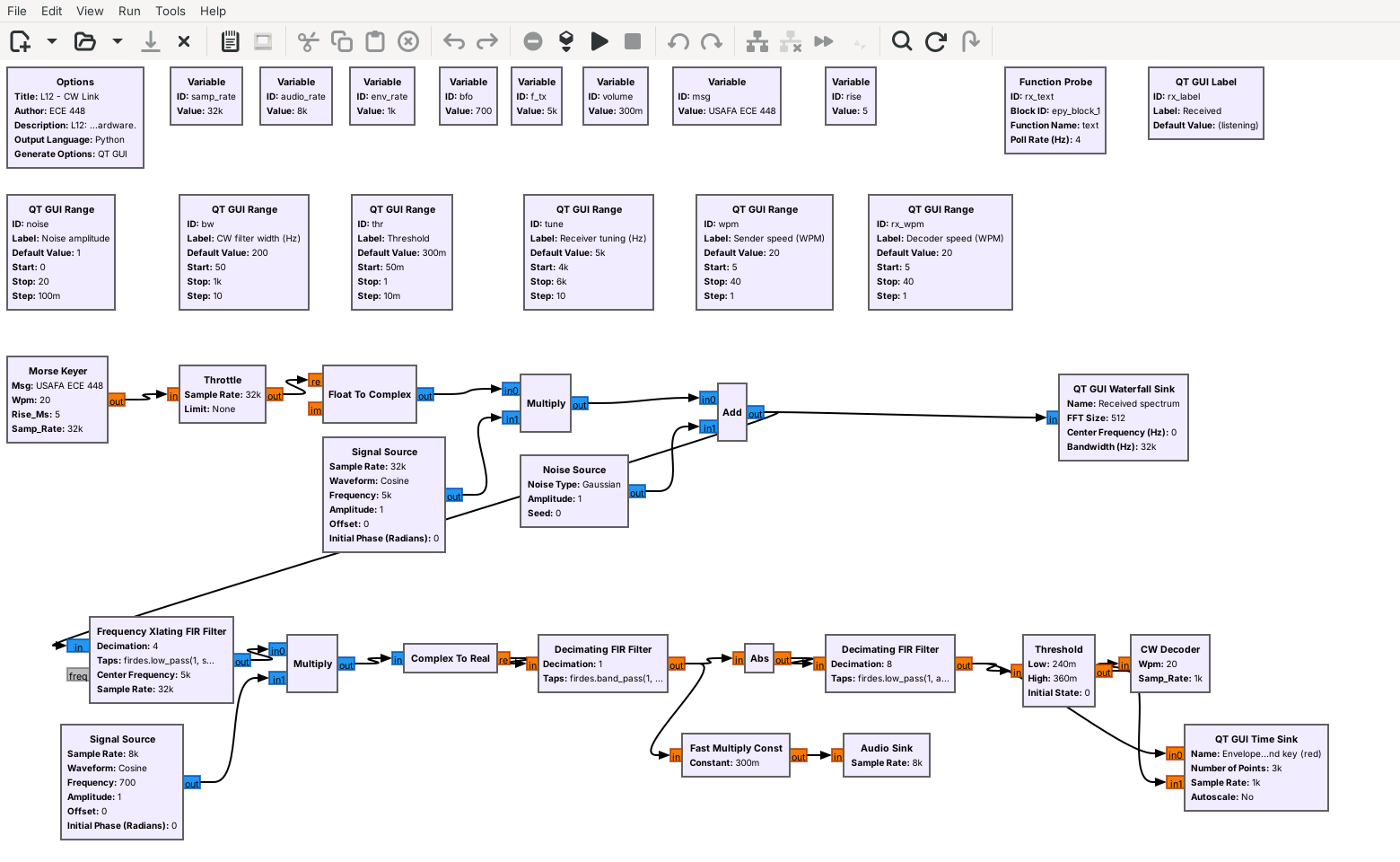 Tune, product detector, CW filter, envelope, threshold, decoder.
Note:
The Xlating filter moves the 5 kHz carrier to 0 Hz, keeps plus and minus 600 Hz, and decimates by 4 to 8 kHz. The CW filter is a 200 Hz band-pass at 700 Hz. Abs and the low-pass are Lesson 6's envelope detector, decimating to 1 kHz.
---
## The Product Detector
- Multiply by a 700 Hz **BFO**, keep the real part.
- The carrier becomes a 700 Hz tone.
- A tuning error $\Delta f$ moves the tone to $700 + \Delta f$ Hz.
The tone has to stay inside the CW filter.
Note:
Tuned 40 Hz low, the tone comes out at 740 Hz, and a narrower filter leaves less room for that error. The Xlating filter's 600 Hz limit also keeps a signal 1.4 kHz below the carrier from landing on the same tone.
---
## Envelope and Threshold
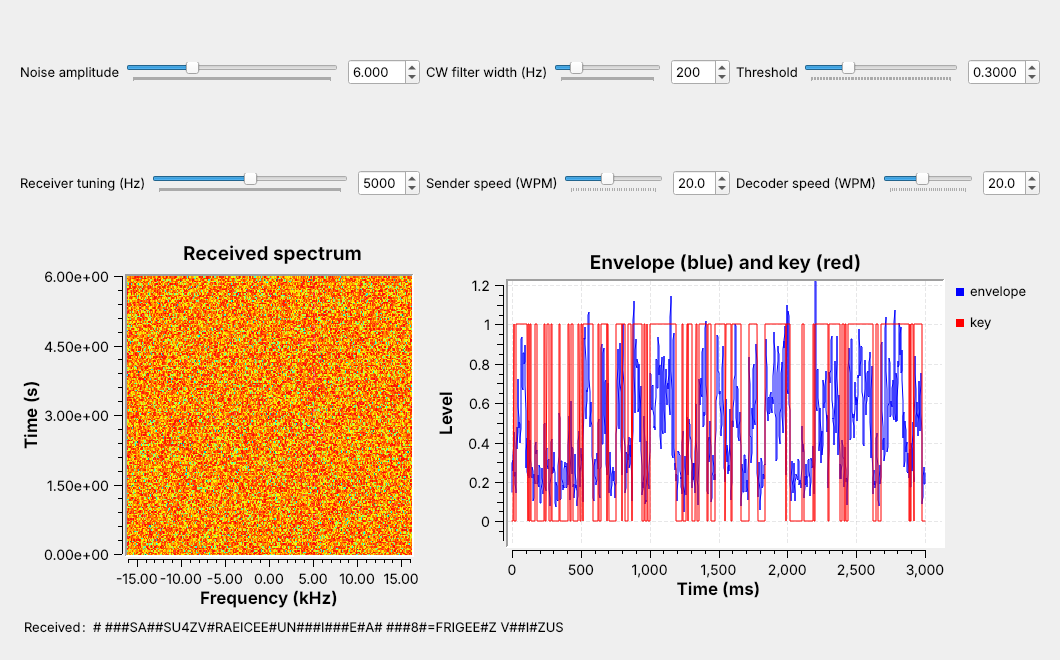 Set the threshold halfway between the space and mark levels.
Note:
The envelope reads about 0.64 during a mark on the plot. The Threshold block switches up at 1.2 times thr and down at 0.8 times thr; that hysteresis stops chatter near the threshold. At noise 6 the space level rises to 0.26, so thr must move from 0.3 to 0.47.
---
## Decoding Marks and Spaces
Marks under 2 units are dits; a 2-unit space ends a letter, a 5-unit space a word.
Note:
Each boundary sits between two values a perfect sender produces. A pattern not in the table comes out as a #. The lab finds how far the sender's speed can drift from the decoder's.
---
## Noise
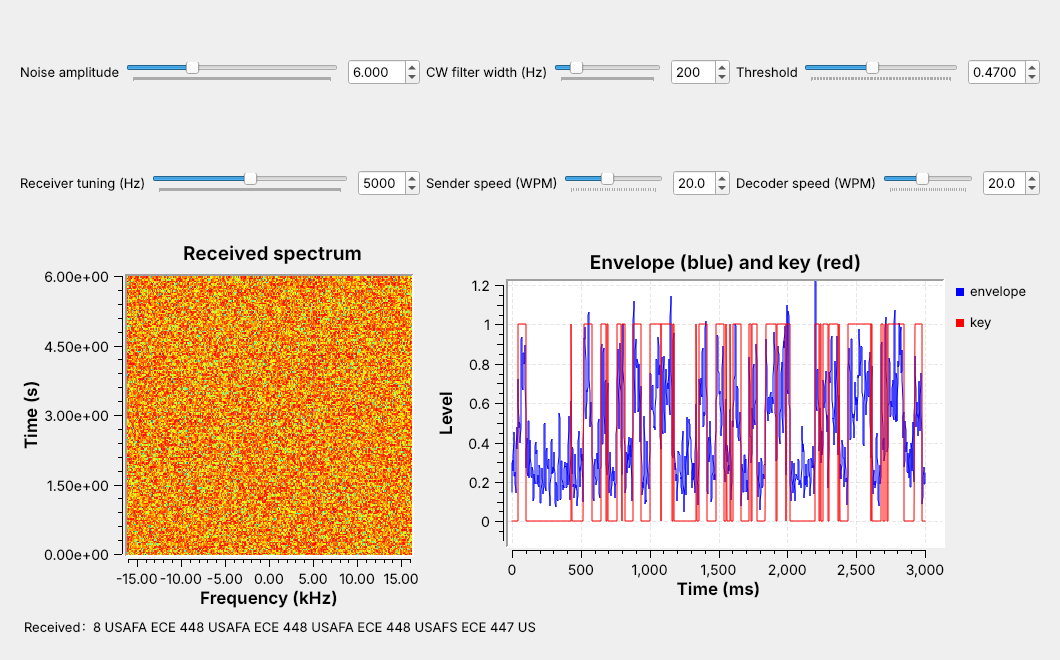 Noise at 6 hides the carrier on the waterfall, yet most of the text arrives.
Note:
Raise the noise slider live and watch the waterfall fill, the envelope's space level rise, and the first wrong letters appear. Each one is a mark that noise split, shortened, or invented: here A read as S and 8 as 7.
---
## Filter Width
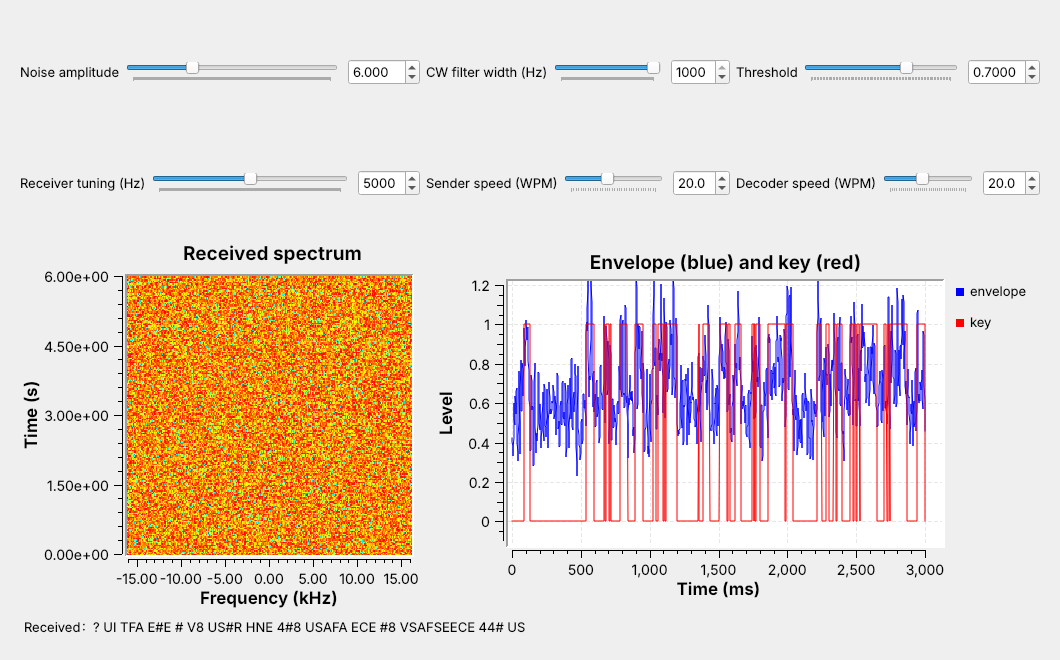 1 kHz: much of the text breaks. 50 Hz: nearly all of it arrives.
Note:
Same noise, three filters: drag the CW filter slider live. A narrower filter passes less noise, which is Lesson 2's point. Its limit is tuning: the tone must stay inside the filter.
---
## CW on a Real Radio
- L12 Lab: one PlutoSDR, TX port to RX port, 30 dB attenuator
- An AGC restores the envelope level; check the threshold line
- Nothing in L12 transmits over the air
- L12-vor-pluto.grc: hear a VOR's Morse identifier in AM
Note:
In class we transmit only into a cable, into a shielded enclosure, or at very low power in an ISM band, and only when the lesson says to. The PlutoSDR flowgraph has run only in simulation so far; the lab is its first run on hardware. Run L12-vor-pluto.grc, type the nearest VOR's frequency (108 to 118 MHz; its frequency and identifier are on an FAA sectional, free at SkyVector), and wait for its identifier, a 1020 Hz tone, as dashes either side of the carrier on the channel waterfall. The Pluto tunes 100 kHz low so its DC correction leaves the carrier alone, with slow-attack AGC; GNU Radio's AM Demod block makes the audio. Course Plutos run in extended-frequency mode, 70 MHz to 6 GHz. Not yet run on a live VOR. Most amateur CW is on HF, below the Pluto's 70 MHz; 2 m CW at 144.0 to 144.1 MHz is in range.
---
## Key Point