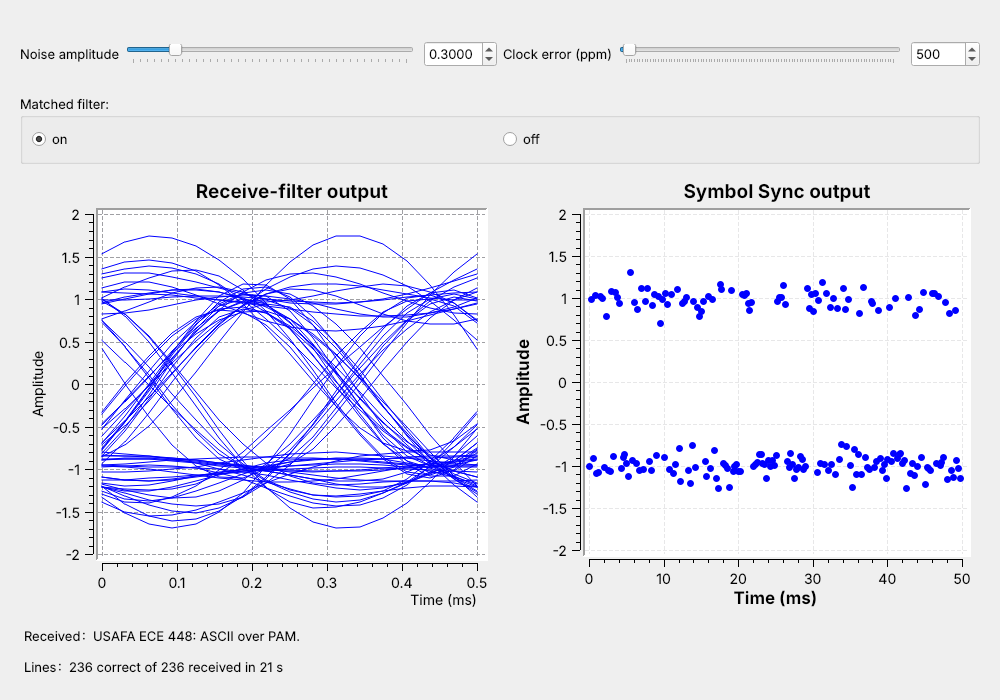
 Every line arrives at noise 0.3 and a 500 ppm clock error.
Note:
Run L10-pam-link.grc live. The eye and the Symbol Sync plot are Lesson 9's checks. The Lines label climbs by about 11 every second.
---
## Text to Bits
'U' is 0x55; Unpack K Bits sends it MSB first: 01010101.
Note:
The Vector Source holds list(msg.encode()) plus 10, the newline. Our line is 30 characters plus the newline: 31 bytes, 248 bits, 62 ms at 4 kbaud.
---
## Where Does a Byte Start?
One bit late, "USA" reads 0xAA, 0xA6, 0x82.
Note:
Nothing in the bit stream marks a byte boundary. The fix is a known pattern in front of the data, which the receiver searches for.
---
## Packets
- 64-bit **access code**, then the length twice, then the text
Note:
The packet uses the same format as the L8 link. The access code and header add 96 bits to the 248 bits of text, so a packet is 344 bits and lasts 86 ms. The link sends 11.6 packets a second, and 72% of the bits are text. A 200-byte payload raises the text share to 94%.
---
## Bits to a Waveform
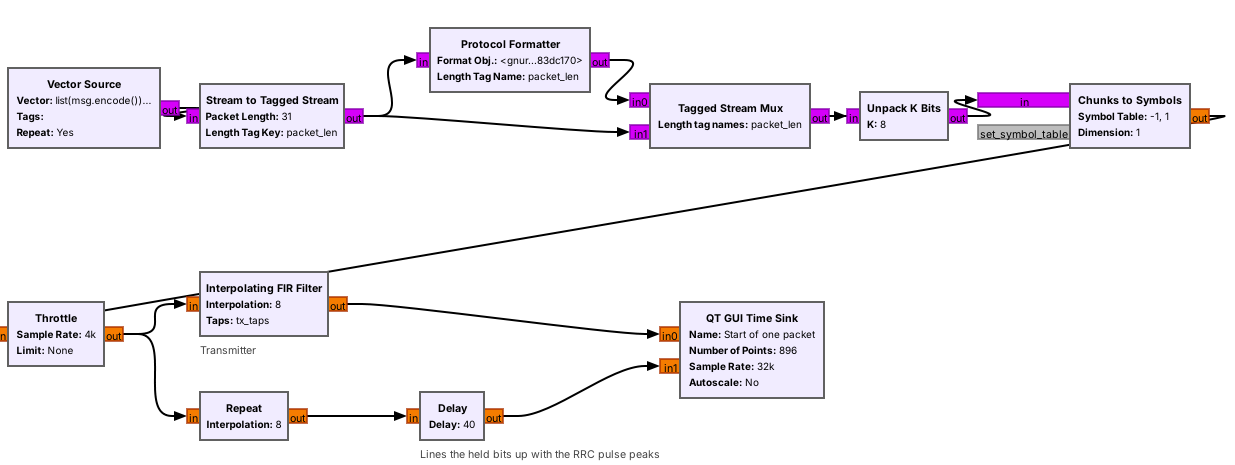 Protocol Formatter writes the header; Tagged Stream Mux puts it in front.
Note:
Stream to Tagged Stream cuts the message into 31-byte lines and tags each one with packet_len. The format object is digital.header_format_default with the default access code. From Unpack K Bits on, it is the L9 transmitter: alpha 0.35, sps 8, 32 kHz.
---
## One Packet on the Wire
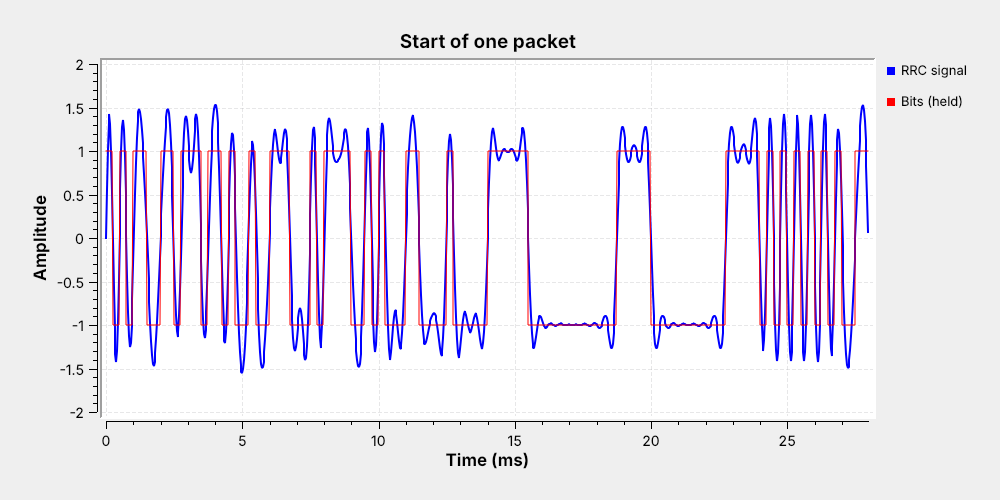 0–16 ms access code · 16–24 ms length 31, twice · then 'U', 'S'
Note:
The time sink triggers on the packet_len tag. 31 in 16 bits is eleven zeros and five ones, so the header sits low for 2.75 ms and high for 1.25 ms, twice. The payload starts at 24 ms with 01010101.
---
## The Receiver
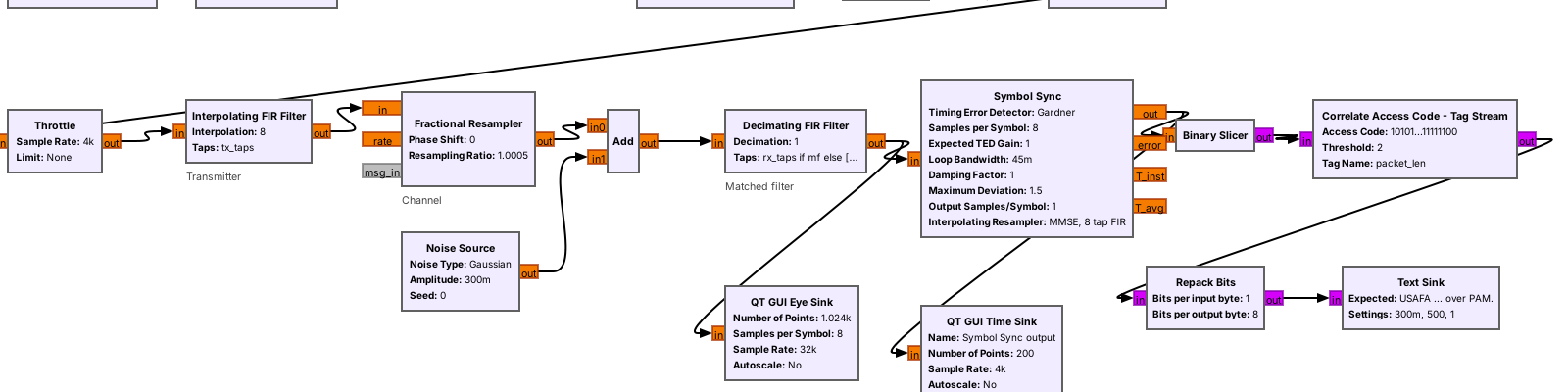 - Matched filter and Symbol Sync: Lesson 9's settings
- From the L8 link: Binary Slicer, Correlate Access Code, Repack Bits
Note:
The channel is a Fractional Resampler for the clock error and a Noise Source. The Binary Slicer outputs a 1 for any sample above zero. Repack Bits packs 8 bits into a byte, MSB first. The Text Sink is the Embedded Python Block from Lesson 8.
---
## Finding the Access Code
- Compare the last 64 bits with the code after every bit.
- Random bits match about 32 of 64.
- At most 2 differences: a packet starts here.
- Read the 32-bit header, then pass on that many bytes.
Note:
The two copies of the length must agree, or the block drops the packet. Random bits almost never come within 2 bits of a 64-bit code, so false starts are not a worry.
---
## PAM Packet Explorer
- Lower the SNR: red circles, then wrong characters, then no packet.
- Inverted: the match count drops to zero and nothing arrives.
- Read LSB first: packets arrive, text is unreadable.
↗ Interactive on the lesson page
Note: Start at 12 dB, where the search finds the packet at bit 40. Press new noise a few times near 8 dB to show the header check failing. --- ## Noise Without a Matched Filter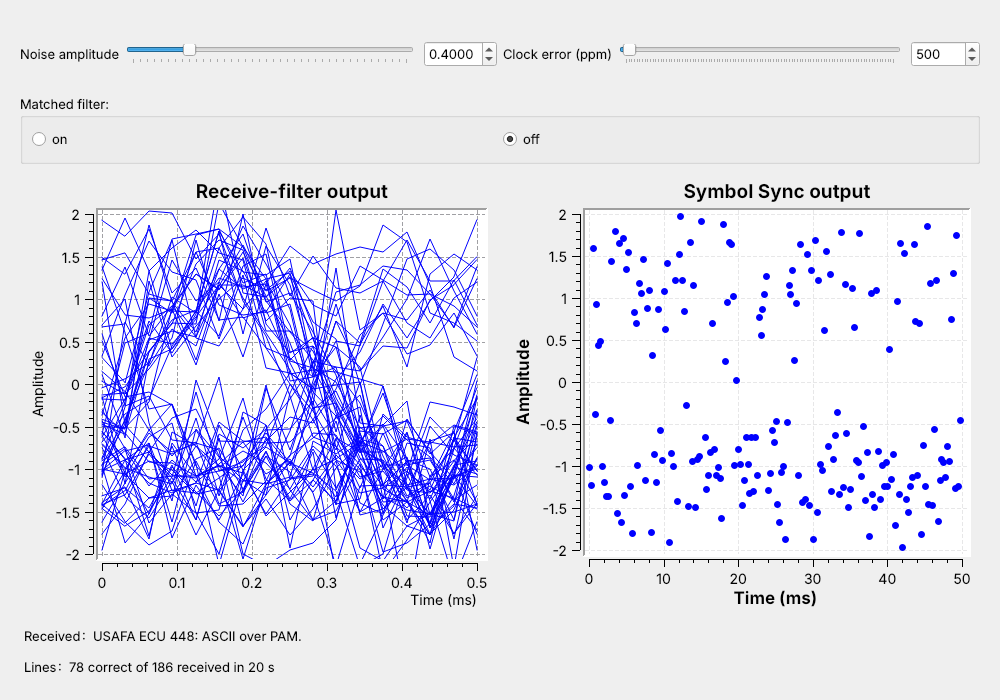 Matched filter off, noise 0.4: watch the characters go wrong.
Note:
Click the Matched filter switch off, then set the noise to 0.4. The noise across the whole 32 kHz reaches the slicer, the eye has almost no opening, and the symbols scatter toward zero. Point at the Lines label: correct falls behind received. This is the third act of the Mathys reading (Mathys 2016, on the lesson page).
---
## The Matched Filter
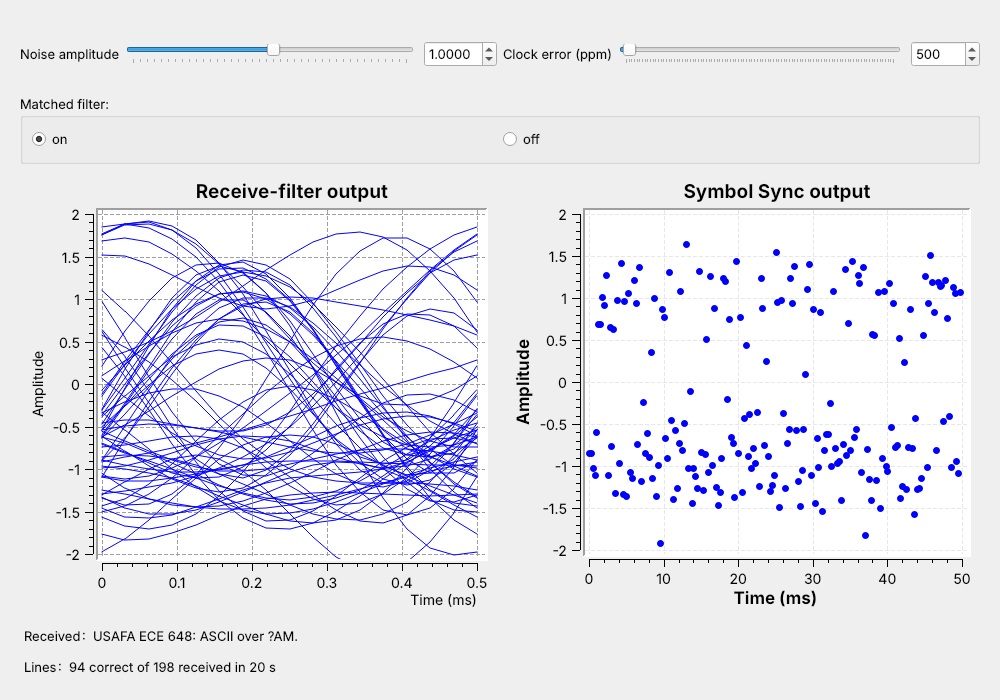 Filter on: every line again. Raise the noise until it breaks.
Note:
Switch the filter back on at 0.4 and every line arrives. Then drag the noise up live and stop when characters go wrong; the lab finds the exact settings. A line needs all of its header and payload bits right, which is why the change from all to none is so quick. Point at the eye and the bands.
---
## Clock Error
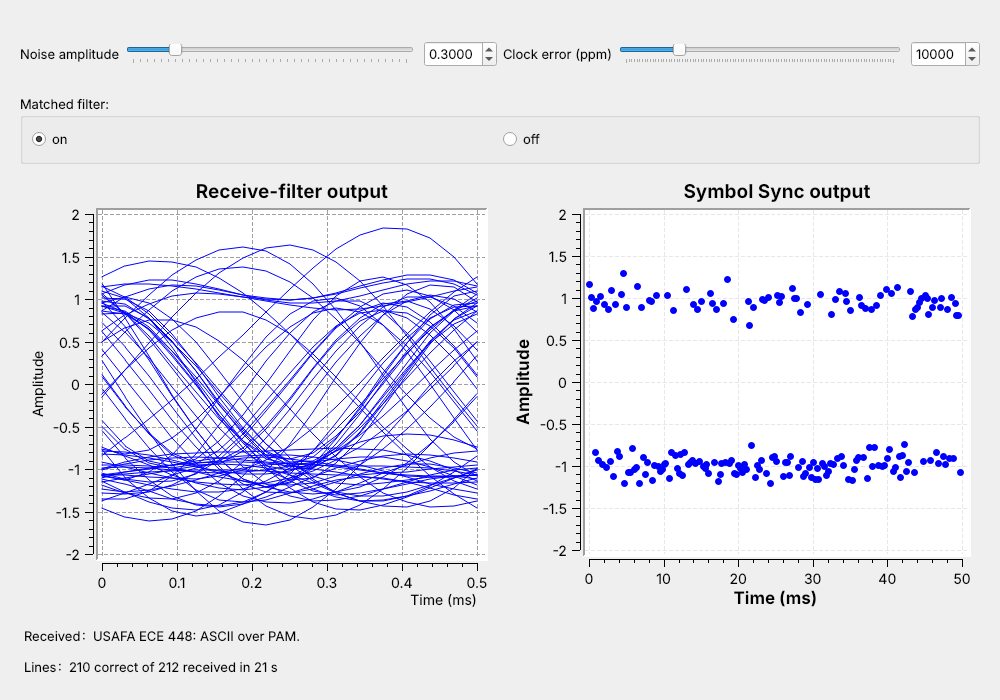 Symbol Sync locks cold to about 25,000 ppm; two 20 ppm crystals differ by up to 40 ppm.
Note:
The eye sink assumes exactly 8 samples per symbol, so it smears at 1%. Symbol Sync tracks the difference. Started cold, the link loses under 1% of lines at 10,000 ppm and a few percent from 15,000 to 25,000 ppm, often fails to lock at 30,000, and never locks at 40,000. Raised a step at a time while locked, it follows 40,000 ppm and beyond.
---
## Mismatched Settings
| Receiver setting | Result |
| :-- | :-- |
| Polarity inverted | no packets: 0 of 64 bits match |
| LSB first | packets arrive, text unreadable |
| Wrong `sps` | no packets |
| Wrong access code | no packets |
Note:
Read LSB first, 'U' 01010101 becomes 10101010, 0xAA. The polarity case happens on a real radio, which is the next slide.
---
## PAM Text on a Real Radio
- One PlutoSDR at 915 MHz, TX port cabled to RX port
- Resample 32 kHz up to 1.024 MS/s and back down
- Costas Loop for the carrier phase, plus a polarity switch
Nothing in L10 transmits; the L10 Lab transmits into a cable.
Note:
In class we transmit only into a cable, into a shielded enclosure, or at very low power in an ISM band, and only when the lesson says to. The Costas Loop is Lesson 15; today it is one block that can lock upside down, which inverts every bit.
---
## Key Point